Table of Contents
Command Line Tool (sniffer-cli)
Alongside the desktop app, MantaTrace ships a standalone command line tool, sniffer-cli, for headless capture, scripting, capture replay and firmware maintenance. It talks to the same sniffer hardware over serial and produces the same JSON capture format as the desktop app. There is no separate download — the CLI is built into the application binary installed by the desktop app installer. Run the app executable with the cli subcommand: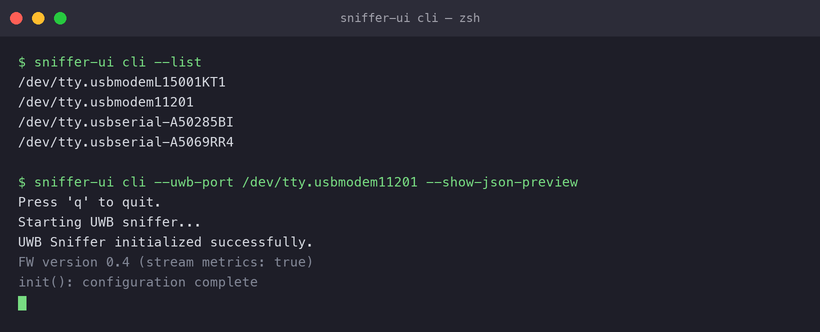
Listing serial ports
Run sniffer-ui cli --list to print the available serial port paths and exit. Use this to find the port of a connected sniffer before starting a capture.Capturing
Point the tool at one or more sniffers by serial port:Output options
Replaying captures
Filters and BLE options
External Trigger
The External Trigger chain also runs headless, so scripted runs — including the CCC time-sync use case — do not need the desktop app:- The chain is armed when the capture starts, and trigger activity is reported on the console exactly as it appears in the UI packet list: stage-passed, chain-fired (with outcome and elapsed time) and chain-ended events are printed inline in the output stream.
- Stage and chain timeouts are reported the same way, so a timeout printed on the console marks a failing run — for the CCC use case, a device that did not start UWB ranging on schedule.
Firmware update
Firmware maintenance for UWB sniffers is done through the CLI — there is currently no firmware update button in the desktop app.1.Put the board in its bootloader: hold Button 1 and press RESET. LED1 lights, and a new serial port named MantaTrace Bootloader appears (for example /dev/tty.usbmodem1101 on macOS, or a new COM port on Windows).
2.Run sniffer-ui cli --fw-update --hw-type dk --uwb-port /dev/tty.usbmodem1101, using the bootloader's port.
3.Wait for the update to finish. The board restarts into the new firmware, the bootloader port disappears, and the sniffer's own port comes back.
4.Check it with sniffer-ui cli --fw-version --uwb-port
To update a Murata Type2AB:
1.Put the board in its bootloader: hold the user button and press reset. A new serial port named MantaTrace Bootloader appears.
2.Run sniffer-ui cli --fw-update --hw-type 2ab --uwb-port
3.Wait for the update to finish. The board restarts into the new firmware, and the sniffer's own port comes back.
4.Check it with sniffer-ui cli --fw-version --uwb-port
If a DK or Type2AB update is interrupted, put the board back in its bootloader and run the update again.
To update a Murata Type2BP:
1.Put the board in its bootloader: hold SW2 and press SW1. LED3 lights and stays lit.
2.Run sniffer-ui cli --fw-update --hw-type 2bp --uwb-port /dev/tty.usbserial-XXXX, using the board's usual serial port. No new port appears for the bootloader.
3.Wait for the update to finish. It takes about a minute.
4.The board restarts into the new firmware and answers again after about 25 seconds. Check it with sniffer-ui cli --fw-version --uwb-port /dev/tty.usbserial-XXXX.
If an update is interrupted, the board stays in its bootloader with LED3 lit, and you can simply run the update again.
